Building a recognizable AI influencer across multiple images and scenes presents a common challenge: maintaining AI character consistency. Faces can subtly shift, features might alter, and signature details can disappear, making your digital persona look like a different individual in each new context. This guide, based on documented workflows and features, not hands-on benchmarks, breaks down what causes that drift, how reference-locking workflows address it, and how to build a repeatable process so your influencer's face, body, and wardrobe hold together across dozens of posts.
What "AI Character Consistency" Actually Means for an Influencer
When creators discuss AI character consistency for an influencer, they typically refer to four elements remaining stable across various images and scenes: facial structure, body proportions, hair, and a recognizable wardrobe or "brand identity." The goal for an AI influencer is for followers to consistently recognize the same "person" whether they appear in a coffee shop photo, a gym selfie, or a travel reel.
This pursuit of consistency differs from simply achieving high general AI image quality. A tool might generate a stunning single portrait, yet struggle to maintain that identity when asked for a second pose. This is why reference-based workflows, rather than solely relying on prompt engineering, have become a key strategy for maintaining character identity.
Before You Start: The Prerequisite Workflow
This article assumes you already understand the basics of setting up a persona, naming it, defining a niche, and generating that first hero image. If you haven't done that yet, the practical starting workflow in how to create an AI influencer walks through those foundational steps first. Come back here once you have a character and need to keep them looking the same across many posts.
The Reusable Identity Checklist
Before generating scene after scene, lock down these details in writing. Treat this as your influencer's identity sheet:
- ✅ Face shape, jawline, cheekbones, eye shape and color, described in plain words
- ✅ Skin details, tone, freckles, marks, or scars that should never disappear
- ✅ Hair, color, length, texture, and a default style
- ✅ Body type, height impression, build, posture
- ✅ Signature wardrobe pieces, one or two items that appear often (a jacket, glasses, jewelry)
- ✅ Approved reference image, the single portrait everything else gets checked against
Keep this checklist somewhere you'll actually reopen it, a notes document works fine. Every time you generate a new scene, glance back at it before deciding the image "passes."
Step-by-Step: Locking Your Influencer's Look in Prism
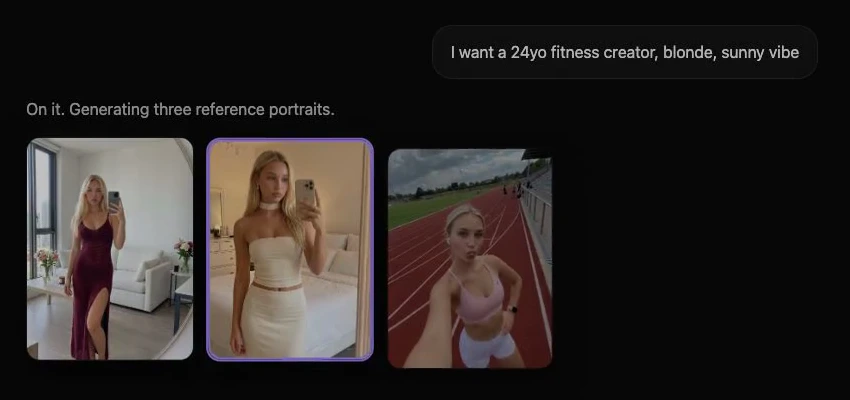
Prism's character workflow is designed around reuse rather than one-off generation. Character creation accepts either a detailed written description or an owned reference image you have rights to use. Once that character is approved, the same reference is reused across new generations, instead of the model reinterpreting your influencer from scratch each time.
A practical sequence looks like this:
- Create the character once. Provide either a detailed description (using the identity checklist above) or an owned photo/reference you have rights to use.
- Review the approved reference carefully. This is the version every future image will be checked against, so confirm the face, hair, and signature details match your checklist before moving on.
- Reuse that character in the Image tool for new scenes, changing only the setting, pose, or lighting in the prompt, not the identity description.
- Use the Video or Motion tools when you need movement, keeping the same character reference rather than describing the person again from text alone.
- Batch-generate variations (different outfits, different backgrounds) once a single scene passes your three-scene test below.
- Upscale final selections rather than upscaling every draft, so you're not wasting generations on images that haven't passed a consistency check yet.
Example prompt structure (for illustration only):
Same character, walking through a rooftop café at golden hour, casual denim jacket, relaxed smile, natural lighting, three-quarter angle.Notice what's absent: no re-description of face shape, eye color, or hair. That information lives in the locked character reference, not the scene prompt. Repeating identity details in every prompt is often where drift creeps back in, because the model starts blending your new wording with the reference instead of trusting it.
The Three-Scene Consistency Test
Use the AI influencer scene prompts as starting templates for controlled variations; keep your approved reference fixed while you compare the results.
Before committing to a full content batch, run any new character through three deliberately different scenes:
- A close-up portrait in flat, even lighting
- A three-quarter body shot in an outdoor or high-contrast setting
- An action or candid pose (walking, laughing, turning)
If the face, proportions, and signature wardrobe piece hold up across all three, the character reference is solid. If any single scene breaks identity, that's the scene type to investigate, not a sign the whole character needs rebuilding.
Troubleshooting Table: Common Drift Problems
| Problem | Likely Cause | Corrective Action |
|---|---|---|
| Face drift (jaw, eyes, or nose shift between images) | Prompt re-describes facial features instead of relying on the reference | Remove facial descriptors from the scene prompt; reuse the approved character reference only |
| Body proportions change (height, build inconsistent) | Scene prompt implies a different pose or camera distance that the model fills in with generic proportions | Add a simple body-type note ("same build as reference") and keep camera distance similar to the original reference |
| Accessories missing or wrong (glasses, jewelry disappear) | Accessory wasn't part of the original reference, only mentioned in text | Include the accessory in the reference image itself, not just the prompt, whenever possible |
| Lighting mismatch breaks recognizability | Extreme lighting change (harsh shadow vs. flat light) alters perceived skin tone and facial contrast | Generate a mid-lighting reference version first, then vary lighting gradually rather than jumping to extremes |
Industry discussions often describe a "re-anchoring" habit: regenerating a batch, selecting the closest match, and using that image as the new best reference when drift begins. This manual loop can be more reliable than hoping a single prompt tweak resolves all issues.
Reference-Locking Elsewhere: How Other Tools Approach Consistency
Prism isn't the only platform addressing this challenge, and it's worth understanding the broader landscape. Tools like OpenArt's Character workspace are built specifically around persistent character references for illustration and design work, letting creators anchor a character's look across a project. Other platforms use "character lock" or reference-weight sliders that let you dial in how strongly a new generation should match the original portrait.
For a broader comparison of tools built around consistent-character workflows and their tradeoffs, the Higgsfield alternatives roundup is a useful next stop. It's also worth keeping your original tool in mind, since switching platforms mid-campaign often reintroduces the exact drift problem you're trying to avoid.
Common Mistakes That Break AI Character Consistency
- Re-describing the face in every prompt. This fights against the reference instead of trusting it.
- Skipping the three-scene test. Approving a character off one flattering portrait, then discovering drift after 20 images are already generated.
- Changing lighting and pose at the same time. Isolate one variable per test batch so you know what caused a failure.
- Forgetting signature accessories in the reference itself. Text mentions are weaker than a visual anchor.
- Never updating the "best reference." If a later generation looks more on-model than the original, use it as the new anchor.
Going Further: LoRA and IP-Adapter Approaches
For teams requiring tighter control at scale, some advanced workflows involve training small custom models (often called LoRA adapters) on a set of reference images, with commonly cited ranges suggesting around 15 to 30 varied photos of the same character. Other methods utilize IP-Adapter-style modules, which encode a reference image and integrate it into the generation process to reinforce identity without requiring full model retraining. These represent more technical approaches, typically better suited for brand teams with dedicated production needs rather than a solo creator just starting. For most influencer projects, the reference-locking workflow described above provides an effective starting point.
AI character consistency isn't magic; it's a repeatable process built on a locked reference, a written identity checklist, and a habit of testing across varied scenes before scaling up. Start with the identity checklist, run every new character through the three-scene test, and use the troubleshooting table the moment something looks off rather than regenerating blindly.
Once a character reference is approved, reuse it deliberately across Prism's Image, Video, Motion, and Batch tools rather than re-describing the influencer each time. If you're still setting up your first persona, revisit the AI influencer creation workflow for the foundational steps, and check the Academy for deeper walkthroughs on building out a full content pipeline once your character's look is locked in.